Studio work
C-Beams
I work across C-Beams, from UI, input and shaders to physics and the glue in between, building the systems that make a ship feel like a ship, and much more across the game.
This page looks at three of the systems I built from the ground up: how a ship flies, how the camera follows it, and resource acquisition through mining.
- Role
- Gameplay & Systems Programmer
- Studio
- Distant Light Games, with Hooded Horse publishing
- Since
- April 2024, ongoing
- Tech
- Unreal Engine 5, C++
The project
C-Beams is a top-down space action RPG about piloting a ship through a black hole system. Ships have highly realistic handling, with retro burns, engine cut-off drifting and maneuvering thrusters. Ships have mass, and they have engines in specific places, so flying is a physics problem rather than an animation.
I joined the small team in April 2024 and started by developing the movement plugin in isolation. I created the movement, camera and mining plugins, and I maintain them. The teaser trailer above shows all three at work. The game isn't out yet, and Hooded Horse is publishing it.
Newtonian movement
Ships aren't moved directly. Everything is a force or a torque applied to a simulated rigid body, so momentum, mass and available thrust decide what a ship can do. Player and AI ships run the exact same movement code, so an NPC flies by the same rules as the player.
- A flight computer. The Propulsion Brain takes the inputs and passes them on to the relevant propulsion systems.
- Physics-step updates. Forces are calculated in
AsyncPhysicsTickComponent, reading state from the physics thread's rigid body handles, so behaviour follows the simulation rather than the frame rate. - Physical units. Thrust and torque are specified in kilonewtons and kilonewton-metres, so a ship's handling comes from its mass and its configuration.
- Separate propulsion types. Rockets handle main drive and thrusters handle maneuvering, each with its own boost. Linear and angular braking can be toggled independently.
- Modular control. The controller is a controller component, so it attaches to either a player or an AI controller.
Why not a PID controller
A PID controller only reacts to the error in front of it, so each ship's handling ends up encoded in its gains. With anywhere from 10 to 100 ships of different thruster and rocket configurations, shapes, masses and sizes, every controller would have to be fine-tuned to its specific ship, then re-tuned for any change to the movement code. Even then, it's a semi-black box: it gets semi-optimal results, and it can't promise perfect ones.
The ship's physics is already known, so the answer can be derived instead. Its maximum torque and inertia give its maximum angular acceleration, and with its current angular velocity that gives the angle it needs to stop:
α = τmax / I θbrake = ω² / 2α
Every physics step, the ship compares that stopping angle with the angle left to turn:
- It can stop in time: keep turning toward the target direction.
- It's about to overshoot: brake.
- It's turning the wrong way: apply torque back toward the target.
- It's spinning too fast to stop in time: work out where it would come to rest, whole revolutions included, and use that miss to decide whether to brake or carry the spin around.
There are no controller gains to tune. Change a ship's thrusters or mass, and the numbers change with them. The direction comes from the player's or AI's input, and with no input the ship stops turning. Mining only changes where the direction comes from, by aligning the ship to the asteroid.
Dynamic camera
A top-down camera has to show the player's ship, what it's fighting or mining, and what's coming, while targets range from small ships to enormous objects. I built this as a stack of small modifiers on a custom player camera manager. Each one does a single job, and stacks are configured in data so they can be swapped at runtime.
- Adaptive frame brings a target into view alongside the player.
- Adaptive lead shifts the view in the direction of travel, based on velocity and optional curves.
- UI evasion reacts to on-screen widgets so the HUD doesn't cover what the player is looking at.
- Boom, FOV, offset and center shift are the smaller building blocks.
Framing without iteration
The exploration framing runs every frame, so it's a closed-form solve rather than a search. In one pass it:
- Caps the pan so the player can't leave the widest frustum the camera can reach. The player stays in frame by construction.
- Tests whether the target fits that frustum, at separate entry and exit margins. This drives the hysteresis, so framing doesn't flicker at the boundary.
- Solves a single push factor that moves FOV and distance together: out when the target is far, in when it's close.
Combat uses a separate mode with a constant push. Each modifier also has its own world-space and screen-space debug drawing, which made all of this far easier to tune.
Mining
Mining drives the game's progression and exploration, so it has to be fun on its own. The core lives in a plugin, with a game-side adapter module connecting it to ships, asteroids and the HUD.
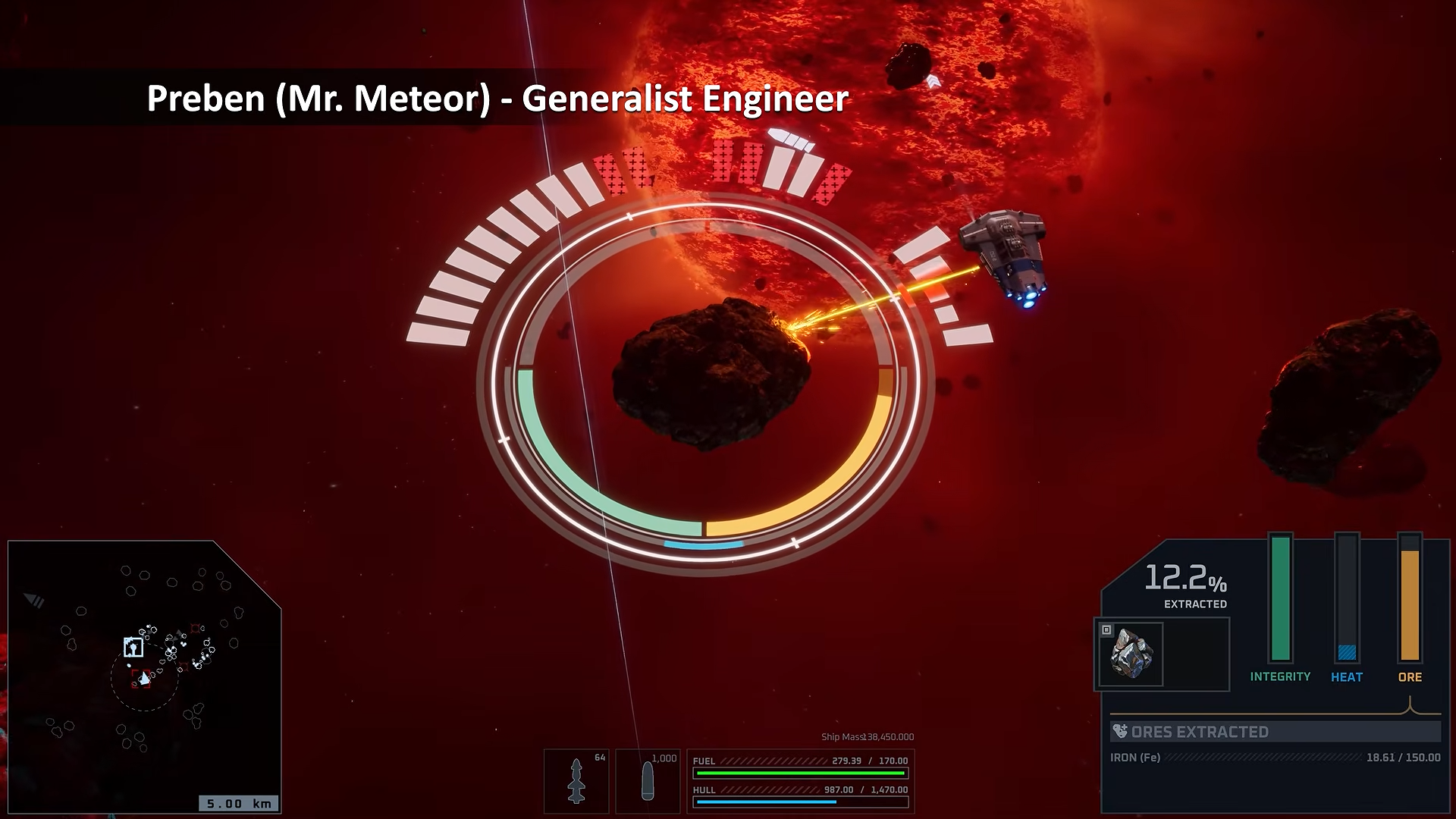
- Seeded deposits. Each asteroid's contents are generated from a seeded random stream: deposits are shuffled and placed around a ring, so asteroids don't all play the same.
- Hazards. Deposits can spawn with danger pockets beside them, so the richest spot isn't always the safest one to drill.
- Heat. Mining builds heat, and heat burns down the asteroid's integrity over time. Players have to work fast and get what they can before the asteroid is destroyed.
- World-space and HUD UI. Rings around the asteroid show deposits and the drill position, with gauges and a resource readout on the HUD.
The mining UI was concepted by Josh Atkinson, and I implemented it in the game.
LevelCap shows it working in Devlog 55, and the readout, danger pockets and heat in Devlog 56.